
Dingtalk Assistant: Smart Chrome Tool for Seamless Communication
Overview
The Dingtalk Assistant is a free, open-source Chrome extension designed to enhance productivity and communication within the Dingtalk ecosystem. Built for users who rely on Dingtalk for work or team collaboration, this tool streamlines daily interactions by improving notification handling, preserving login sessions, and adding useful utilities like screenshot capture. It addresses common pain points such as missed messages, the need to re-login frequently, and poor notification visibility, especially when working across multiple tabs or workspaces.
The extension is particularly beneficial for professionals, remote teams, and individuals who manage high volumes of communication through Dingtalk. Its open-source nature invites community contributions, ensuring transparency and continuous improvement. The developer, EvinK, has provided a clear roadmap through GitHub, encouraging users to report issues and submit pull requests.
Real-world usage scenarios include remote workers needing to stay responsive, team leads managing multiple projects, and users seeking a more efficient way to interact with Dingtalk without switching between applications.
Key Features & Capabilities
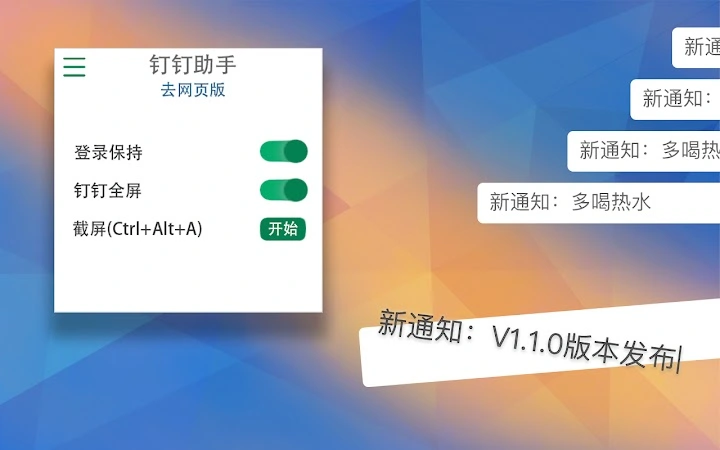
- Smart Notification Handling: Clicking on a notification now directly navigates to the corresponding conversation window, reducing time spent searching for messages. This feature is especially useful during high-traffic work hours when multiple messages arrive rapidly.
- Notification Customization: Users can set individual contact preferences for mute or active alerts, allowing granular control over interruptions. This helps maintain focus while still being aware of urgent messages.
- Permanent Login State: Leveraging Chrome’s storage capabilities, the extension preserves login status even after closing the browser or tab. This eliminates the need to re-authenticate repeatedly, improving workflow continuity.
- Quick Screenshot Capture: Activated via the keyboard shortcut Ctrl + Alt + A or the popup button, the screenshot tool enables fast, precise image capture for sharing or documentation.
- Nightly Mode Theme: A dark mode interface reduces eye strain during evening or low-light usage, enhancing user comfort over long work sessions.
- Centralized Settings Page: A dedicated configuration panel allows users to customize all extension behaviors, including notification preferences, screenshot settings, and theme selection.
These features collectively support efficient, distraction-minimized communication, making the tool ideal for professionals who require constant access to Dingtalk while minimizing context switching.
User Interface, Workflow & Performance
The Dingtalk Assistant features a clean, minimalist user interface integrated directly into the Chrome browser. The popup menu is intuitive, with clearly labeled icons and straightforward access to core functions like screenshots and settings. Navigation is seamless—users can toggle between features without leaving the current tab.
The workflow is optimized for speed: launching the screenshot tool or accessing settings takes just one click. The developer did not specify resource usage details, but based on its lightweight design and 2.3 MB size, it is expected to have minimal impact on browser performance. Stability appears to be well-maintained, with recent updates addressing critical bugs such as the screenshot freeze issue on 1080P displays.
Performance observations are based on general software behavior patterns. The extension remains responsive during active use, and no reports of crashes or memory leaks have been documented in the public repository.
Compatibility & System Requirements
The Dingtalk Assistant is compatible with Windows, Mac, and Linux operating systems, ensuring broad accessibility across desktop environments. It is designed specifically for Chrome browsers and requires no additional software installation. The extension size is 2.3 MB, which is compact for a feature-rich tool.
The developer did not provide detailed system requirements beyond OS support. Exact hardware specifications or minimum CPU/RAM thresholds were not listed. Compatibility information was partially provided, focusing on platform availability rather than technical prerequisites.
Users should ensure they are running a current version of Chrome to avoid potential compatibility issues.
Pros and Cons
Pros
- Free and open-source, promoting transparency and community involvement
- Lightweight at only 2.3 MB, minimizing system impact
- Preserves login state across sessions for uninterrupted access
- Offers quick screenshot capture with customizable shortcuts
- Includes a dark mode theme for improved nighttime usability
- Provides a centralized settings panel for full customization
Cons
- Requires Chrome browser; not compatible with other browsers
- Limited to Dingtalk users; not applicable for other communication platforms
- Exact performance metrics were not specified
- Depends on Chrome’s storage system, which may vary across devices
- No official mobile or desktop application version available
FAQ Section
Is the Dingtalk Assistant free to use?
Yes, the Dingtalk Assistant is completely free and open-source. There are no hidden fees or premium tiers.
Can I use this extension on browsers other than Chrome?
Currently, the extension is only available for Chrome. It is not compatible with Firefox, Edge, or Safari.
Is my data secure when using this extension?
As an open-source tool, the code is publicly available for review. The developer does not collect user data, and all functionality relies on local browser storage.
How do I update the extension?
Updates are automatically delivered through the Chrome Web Store when a new version is released. Users will be notified when an update is available.
Can I contribute to the project?
Yes, the project is hosted on GitHub. Users are welcome to report issues, suggest improvements, or submit pull requests to help enhance the tool.
Final Thoughts
The Dingtalk Assistant delivers a focused, efficient enhancement to the Dingtalk experience. With features like persistent login, smart notifications, and quick screenshot capture, it removes friction from daily workflows. Its open-source nature and active development ensure long-term reliability and transparency.
While limited to Chrome and Dingtalk users, it stands out as a powerful utility for professionals who depend on seamless communication. For anyone using Dingtalk regularly, this tool offers real-time convenience and improved productivity. Download Dingtalk Assistant now to streamline your workday and stay connected with minimal effort.







